

India Post Payments Bank (IPPB), operating under the Ministry of Communications, Government of India, delivers banking services through the vast network of Post Offices across the country. Similar to other banking institutions, IPPB assigns a unique Customer ID (CIF Number) to every account holder for identification and secure access to banking services.
Your Customer ID of IPPB is required for:
- Mobile Banking registration
- Customer verification at Post Office
- IPPB & Post Office Saving Account Linkage
- Doorstep Banking through GDS
If you have forgotten your Customer ID, there are multiple official ways to retrieve it.
This guide explains how to find your Customer ID of India Post Payments Bank quickly using different available methods.
Topics To be Discussed
What is IPPB Customer ID?
An IPPB Customer ID is a unique identification number assigned to every individual at the time of opening an account with India Post Payments Bank (IPPB). This number, also known as the CIF (Customer Information File) number, is used by the bank to maintain and manage your customer profile across all IPPB services. It helps in securely identifying your account when you log in to the IPPB Mobile Banking App, access account-related information, contact customer support, or avail services through Post Office banking points.
IPPB Customer ID by SMS
You can easily recover your IPPB Customer ID using SMS Banking. Follow these simple steps:
- Open your messaging app.
- Type the message in this format:
GETCIF <DDMMYYYY>
(Example: GETCIF 01011990) - Send the SMS to 7738062873 using the registered mobile number.
- You will instantly receive an SMS containing your IPPB Customer ID.
Make sure your mobile number is registered with your IPPB account to use this method successfully.
Through IPPB Mobile App
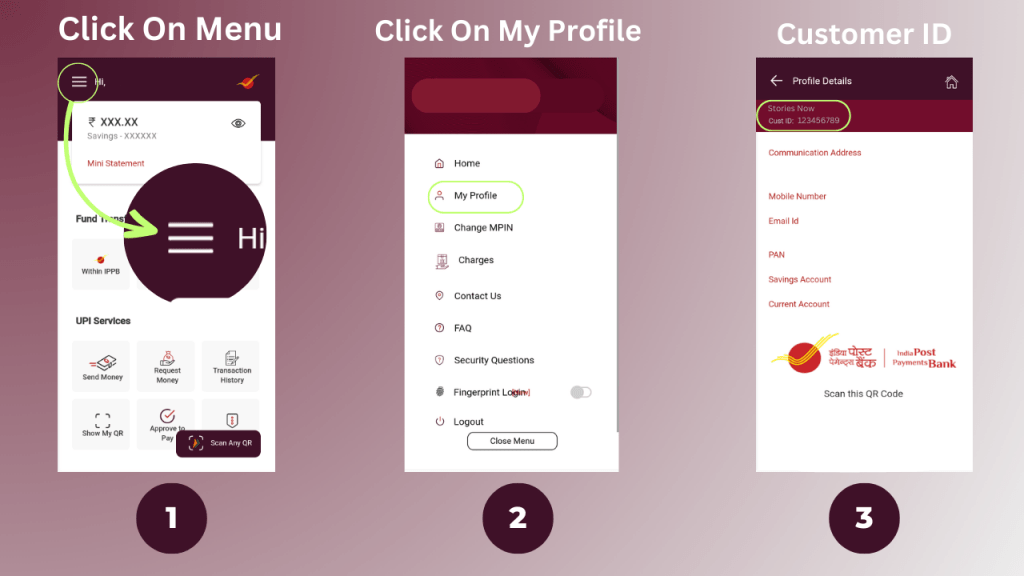
You can easily find your Customer ID using the IPPB Mobile App. Follow these simple steps:
- Open the IPPB Mobile Banking App
- Log in using your MPIN
- Go to Profile / My Account / Account Details
- Your Customer ID will be displayed on the screen
- Follow the steps given below in the image.
Through the IPPB QR Card
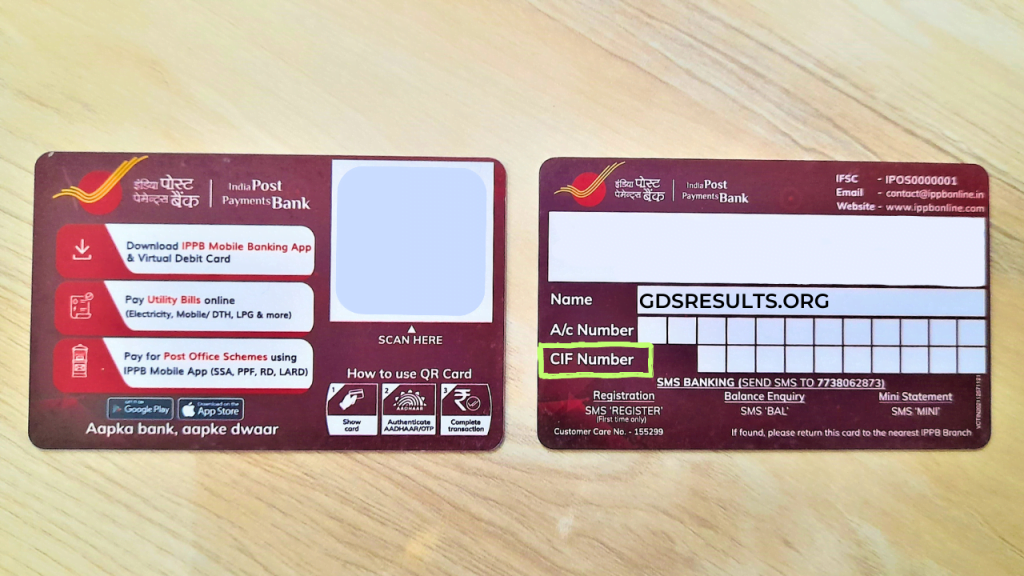
When you open an account, you receive a card containing a QR code. On the back side of the qr card you will find your customer id. An image of the IPPB QR card is given below for your reference to find your customer id.
At Your Nearest Branch Post Office
Most of the branch post offices function as IPPB access points. By verifying your account details, you can obtain your Customer ID in IPPB from GDS Branch Postmasters.
Using Monthly Account Statement
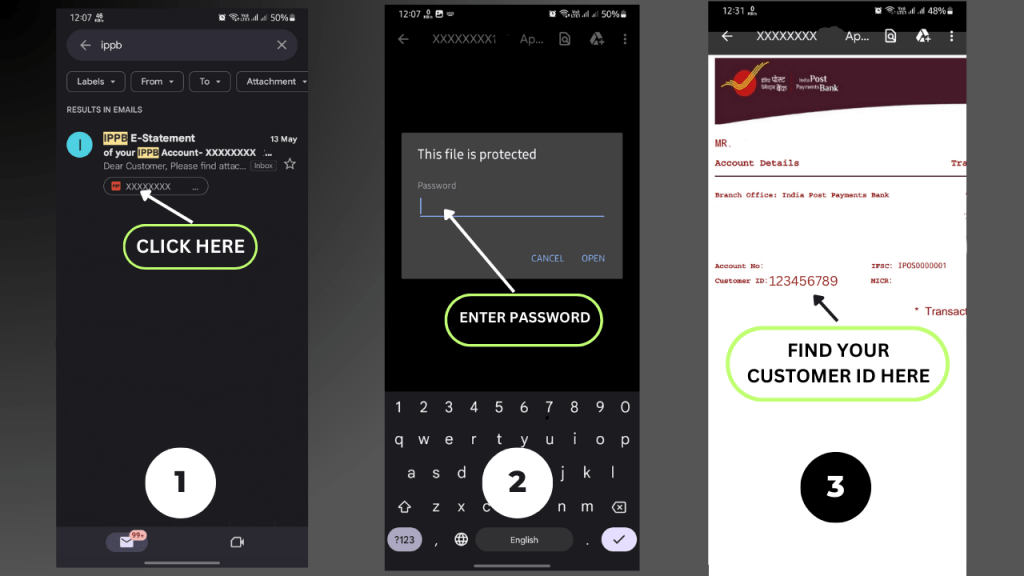
You can download your monthly account statement to check your IPPB Customer ID. If you are using mobile banking, the statement can be accessed through the IPPB Mobile App. If you receive account statements by email, you can also open the statement sent to your registered email ID.
The statement is usually password-protected, so you will need to enter the password to view it. After opening the PDF, your account details will appear at the top of the page, where your IPPB CIF Number is mentioned below the account number. Follow the step-by-step guide illustrated in the image given below.
Through IPPB Phone Banking
You can retrieve your Customer ID through IPPB Phone Banking without visiting the Post Office. Call 155299 or 1800 180 7980 from your registered mobile number and select your preferred language. Follow the IVR options to connect with a customer support executive and request your IPPB Customer ID. You may be asked to provide verification details such as your date of birth or account number. After successful verification, the executive will assist you in retrieving your Customer ID.
FAQs
How can I find my IPPB Customer ID?
Your IPPB Customer ID can be retrieved using multiple methods, including checking your IPPB QR Card, using SMS Banking, contacting IPPB customer care, visiting the nearest IPPB Access Point, reviewing your email statements, accessing the IPPB Mobile App, or checking the front page of your passbook.
How to find your customer ID?
To retrieve a forgotten IPPB customer ID, send an SMS with GETCIF to 7738062873 from your registered mobile number. Alternatively, check your QR card/welcome kit, visit a post office branch, or call 155299.
What is the use of IPPB QR Card?
The IPPB QR card is a secure, physical card with a QR code, enabling account holders to perform quick, cashless transactions, bill payments, and money transfers without needing a PIN or remembering account numbers.
Similar Articles:
Share