

The IT 2.0 Rule 38 Transfer Portal is a major digital upgrade introduced by India Post under the Advanced Postal Technology (APT 2.0) system. This portal simplifies the entire rule 38 transfer process for departmental employees by enabling online applications, status tracking, and transparent workflows.
If you are searching for what is rule 38 transfer, how to apply online, or looking for the latest updates, this guide will walk you through everything step-by-step.
What is Rule 38 Transfer?
Before understanding the portal, it’s important to know what is rule 38.
Rule 38 is a provision in the postal department that allows inter-circle and intra-circle transfers of departmental employees under specific conditions.
In simple terms:
- Rule 38 transfer allows employees to move from one division/circle to another
- It can be:
- Intra-circle transfer (within the same circle)
- Inter-circle transfer (between different circles)
According to the official operational guide , employees must complete at least one year of service before applying for a transfer.
IT 2.0 Rule 38 Transfer Portal Overview
The IT 2.0 Rule 38 Transfer Portal is part of the India Post Employee Portal:
Direct Link: IT 2.0 Rule 38 Transfer PortalThis system replaces the older legacy portal and offers:
- Online application submission
- Mutual and unilateral transfer options
- Real-time status tracking
- OTP-based verification system
- Integration with HR/PIS data
The portal is accessible through HR Solutions (HRMS) under the Employee Self-Service section.
Rule 38 Login Process
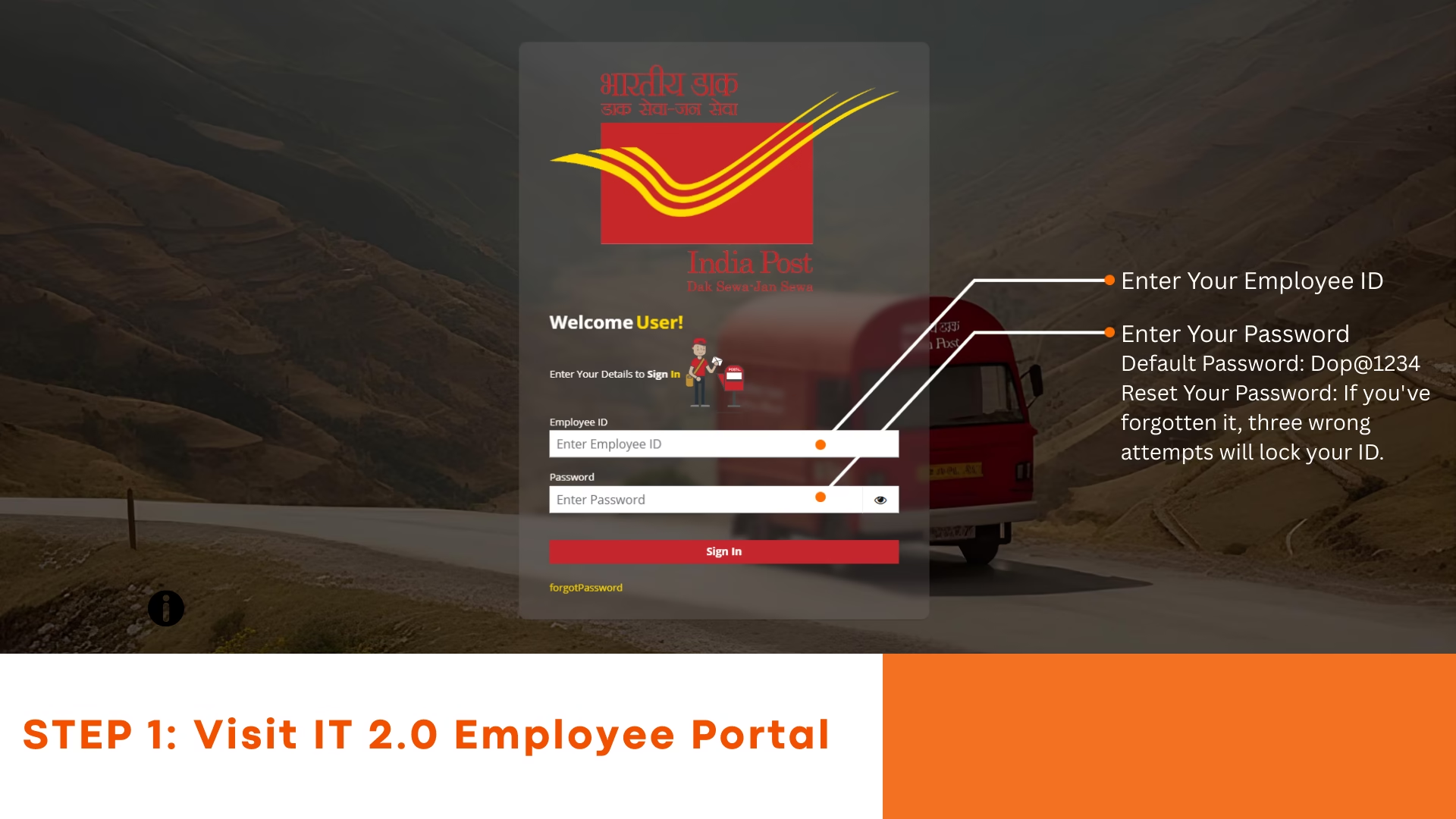
To access the system, follow the rule 38 login steps:
- Visit the Employee Portal
- Enter:
- Username (8-digit Employee ID)
- Password
- Click Sign In
- Navigate to:
- Self-Service → Employee Transfers → Apply Transfer Rule 38
As mentioned in the PDF (page 5) , login is mandatory before submitting any application.
IT 2.0 Operational Guide Rule 38 Transfers Employee Login
Step-by-step IT 2.0 Rule 38 transfer guide for postal employees. Check login, rules, mutual transfer process, and application status online.
Rule 38 Transfer Online: Step-by-Step Process
The rule 38 transfer online process is streamlined in IT 2.0. Here’s how to apply:
1. Open Transfer Application
- Go to Apply Transfer Rule 38
- Read instructions carefully and accept terms
2. Verify Personal Details
- Data is auto-filled from HRMS (PIS)
- Verify:
- Mobile number (OTP verification)
- Email ID (OTP verification)
3. Select Applying Grounds
Options include:
- Illness
- Spouse
- PwBD
- Compassionate
- General
👉 Note: Supporting documents must be uploaded (PDF format, 20KB–200KB)
4. Choose Transfer Type
- Intra Circle
- Inter Circle
5. Select Transfer Mode
- Unilateral
- Mutual transfer (Rule 38 mutual transfer in postal department form)
6. Fill Transfer Details
- Rule 37 status
- Previous Rule 38 usage
- Preferred divisions (up to 10 options)
7. Preview & Submit
- Review application
- Generate OTP
- Final submit
Once submitted, a Request ID is generated and displayed in the status page .
Rule 38 Mutual Transfer Explained
The rule 38 mutual transfer allows two employees to exchange their postings.
Key points:
- Both employees must:
- Be in the same cadre
- Apply under General grounds
- One employee applies first
- Second employee must accept or reject the request
As per the guide (page 22–24) , mutual applications should not be submitted simultaneously.
Rule 38 Transfer Rules (Important Guidelines)
Here are key rule 38 transfer rules every employee should know:
- Minimum 1 year service required
- Maximum:
- 2 inter-circle transfers
- 2 intra-circle transfers
- 3-year gap required for same type of transfer
- Rule 37 users must wait 3 years before applying
- Maximum 10 division preferences allowed
- Application cannot be edited after submission
- Wrong application → withdraw and reapply
Special case:
- Women divorcees may get an additional chance (with approval)
Rule 38 Transfer Process (Complete Flow)
The overall rule 38 transfer process includes:
- Login to portal
- Submit application
- Verification by authority
- Status tracking
- Provisional allotment
- Final acceptance or rejection
Employees can also:
- Withdraw application before allotment
- Cancel allotment after results (within time limit)
Rule 38 Transfer Status Check
To check status:
- Go to Rule 38 Transfer Status
- View:
- Request ID
- Application status
- Event history
Status types include:
- Applied
- Mutual Accepted/Declined
- Under Process
- Allotted
The system also migrated pending requests from the old portal to IT 2.0 .
Provisional Allotment & Final Decision
Once results are declared:
- Employees must Accept or Decline within 72 hours
- If no action → auto-approved
This ensures faster processing and reduces delays.
Can I Apply Rule 38 for More Than One Division?
Yes, but with limitations:
- You can select up to 10 preferred divisions
- But final allotment depends on:
- Vacancy
- Eligibility
- Priority rules
How to Fill Rule 38 Form India Post (Tips)
If you’re unsure how to fill rule 38 form India Post, follow these tips:
- Ensure HRMS data is correct before applying
- Double-check mobile & email (cannot change later)
- Upload proper documents
- Select correct transfer type
- Carefully review before final submission
Rule 38 Transfer Latest News (IT 2.0 Update)
The biggest recent update is the launch of:
👉 APT 2.0 Rule 38 Transfer Portal (2025 version)
Key improvements:
- Fully online system
- OTP-based authentication
- Real-time tracking
- Migration of old applications
- Faster processing
FAQs – IT 2.0 Rule 38 Transfer Portal
1. What is Rule 38 in the postal department?
Rule 38 is a provision that allows India Post departmental employees to request transfers between divisions or circles under specific conditions. It includes both intra-circle and inter-circle transfers.
2. What is Rule 38 transfer?
Rule 38 transfer refers to the official process through which postal employees can apply for relocation to another division or circle using defined eligibility criteria and rules.
3. How to apply for Rule 38 transfer online?
To apply for rule 38 transfer online:
- Login to the Employee Portal
- Go to Self-Service → Employee Transfers
- Click on “Apply Transfer Rule 38”
- Fill the form, verify OTP, and submit
4. What is the IT 2.0 Rule 38 Transfer Portal?
The IT 2.0 Rule 38 Transfer Portal is an upgraded online system under APT 2.0 that allows postal employees to apply, track, and manage transfer requests digitally.
5. What are the eligibility conditions for Rule 38 transfer?
Key eligibility conditions include:
- Minimum 1 year of service
- Must belong to eligible cadre
- Compliance with transfer limits and rules
6. Can I apply Rule 38 for more than one division?
Yes, you can select up to 10 preferred divisions while applying, but final allotment depends on availability and eligibility.
7. What is Rule 38 mutual transfer?
Rule 38 mutual transfer allows two employees of the same cadre to exchange their postings. Both must apply and accept the request through the portal.
8. How to login to Rule 38 portal?
To access rule 38 login:
- Visit the India Post Employee Portal
- Enter your Employee ID and password
- Navigate to Employee Transfers section
9. Can I edit my Rule 38 application after submission?
No, once submitted, the application cannot be edited. If there is an error, you must withdraw the application and submit a new one.
10. What documents are required for Rule 38 transfer?
Depending on the applying grounds, documents may include:
- Medical certificate (for illness)
- Spouse proof
- PwBD certificate
- Other supporting documents in PDF format
11. How can I check Rule 38 transfer status?
You can check your application status by visiting the “Rule 38 Transfer Status” section in the portal after login.
12. What happens after Rule 38 allotment?
After allotment:
- You must accept or decline within 72 hours
- If no action is taken, it is automatically approved
13. What is the difference between intra-circle and inter-circle transfer?
- Intra-circle: Transfer within the same postal circle
- Inter-circle: Transfer between different postal circles
14. How many times can I apply for Rule 38 transfer?
An employee can generally apply:
- 2 times for inter-circle transfer
- 2 times for intra-circle transfer
Subject to rules and conditions.
15. What is Rule 37 and its relation to Rule 38?
If an employee has availed transfer under Rule 37, they must wait 3 years before applying for Rule 38 transfer.
Conclusion
The IT 2.0 Rule 38 Transfer Portal has significantly modernized the transfer system in India Post. With features like rule 38 transfer online application, HRMS integration, and transparent status tracking, employees now have a much more efficient and user-friendly process.
Understanding rule 38 transfer rules, login steps, and application process is essential to avoid mistakes and ensure successful transfer requests.
If you are planning to apply, make sure to follow the correct procedure and keep all documents ready for a smooth experience.
Share